Reading time ~15 minutes
My Updated AI Workflow
- Claude Runs on a VPS Now
- Worktrees Everywhere
- An Updated Workflow
- Updated Settings
- Remote Control
- Conclusions
Earlier this year I blogged about My Claude Code Setup , describing my personal point of view on how I was using Claude Code at that point in time.
Seven months later, my workflow has changed enough to need a follow-up.
So here I want to walk through the main changes to my setup. Think of it as a diff against the previous post, which I’d recommend reading first if you haven’t already.
Claude Runs on a VPS Now
The primary difference is that I moved Claude off my MacBook and onto a dedicated VPS.
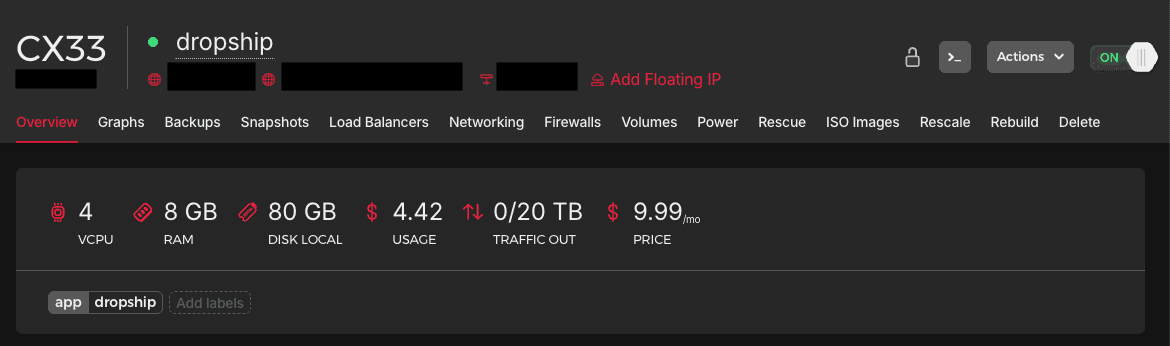
Luckily, I managed to reserve a CX33 VPS (4 vCPU, 8 GB RAM) on Hetzner for $9.99/month before they ran out of compute:
Setting it up came down to two things: how I build the server, and how I reach it.
Server Management
The VPS, and its networking, is completely managed by Terraform.
I’ll leave the details out (your agents can figure out how to create an hcloud_server resource in Terraform),
but I use a cloud-init cloud-config file, passed to the server as user_data, to set it up on first boot:
1
2
3
4
5
6
7
8
9
10
11
12
13
14
15
16
17
18
19
20
21
22
23
24
25
26
27
28
29
30
31
32
33
34
35
36
37
38
39
40
41
42
43
44
45
46
47
48
49
50
51
52
53
54
55
56
57
58
59
60
61
62
63
64
65
66
67
68
69
70
71
72
73
74
75
76
77
78
79
80
81
82
83
84
85
86
87
88
89
90
91
92
93
94
95
96
97
98
99
100
101
102
103
104
105
106
107
108
109
110
111
112
113
114
115
116
117
118
119
120
121
122
123
124
125
126
127
128
129
130
131
132
133
134
135
136
137
138
139
140
141
142
143
144
145
146
147
148
149
150
151
152
153
154
155
156
157
158
159
160
161
162
163
164
165
166
167
168
169
170
171
172
173
174
175
176
177
178
179
180
181
182
183
184
185
186
187
188
189
190
191
192
193
194
195
196
197
198
199
200
201
202
203
204
205
206
207
208
209
210
211
212
213
214
215
216
217
218
219
220
221
222
223
224
225
226
227
228
229
230
#cloud-config
# https://cloudinit.readthedocs.io

#
# General settings
#
timezone: Europe/London
locale: en_GB.UTF-8
keyboard:
  layout: gb
  variant: ''

#
# Hostname
#
hostname: ${instance_hostname}
create_hostname_file: true

#
# Harden SSH: disable password auth as defence in depth
#
ssh_pwauth: false

#
# Group definitions
#
groups:
  - docker

#
# Users definitions
#
users:
  - default
  - name: huser
    gecos: Hetzner User
    shell: /usr/bin/zsh
    primary_group: huser
    sudo: ALL=(ALL) NOPASSWD:ALL
    groups: users, sudo, docker
    lock_passwd: true
    ssh_authorized_keys:
      - ${instance_public_key}
    homedir: /home/huser

#
# Package definitions
#
package_update: true
package_upgrade: true
packages:
  - bubblewrap
  - ca-certificates
  - curl
  - docker
  - git
  - jq
  - pre-commit
  - socat
  - tmux
  - unzip
  - zsh

#
# Files
#
write_files:
  # Cloudflare Tunnel credentials consumed by cloudflared
  - path: /etc/cloudflared/credentials.json
    permissions: '0600'
    owner: root:root
    encoding: b64
    content: ${tunnel_credentials_b64}
  # cloudflared config
  - path: /etc/cloudflared/config.yml
    permissions: '0644'
    owner: root:root
    content: |
      tunnel: ${tunnel_id}
      credentials-file: /etc/cloudflared/credentials.json
      no-autoupdate: true
      loglevel: info
  # systemd unit running the tunnel
  - path: /etc/systemd/system/cloudflared.service
    permissions: '0644'
    owner: root:root
    content: |
      [Unit]
      Description=cloudflared tunnel
      After=network-online.target
      Wants=network-online.target

      [Service]
      ExecStart=/usr/bin/cloudflared tunnel --config /etc/cloudflared/config.yml --no-autoupdate run
      Restart=on-failure
      RestartSec=5
      User=root

      [Install]
      WantedBy=multi-user.target
  # tmux session persistence
  - path: /home/huser/.tmux.conf
    permissions: '0644'
    owner: huser:huser
    defer: true
    content: |
      # Restore windows, panes, layouts, working dirs and pane contents
      set -g @resurrect-capture-pane-contents 'on'
      set -g @continuum-restore 'on'
      set -g @continuum-save-interval '5'

      # Start the tmux server at boot and restore into it
      set -g @continuum-boot 'on'

      # Route saves through the guarded wrapper. tmux-continuum reads this option
      # for both its periodic save (scripts/continuum_save.sh) and the ExecStop
      # line of any systemd unit it generates (systemd_enable.sh), so a unit that
      # gets regenerated can never call the unguarded save.sh again.
      set -g @resurrect-save-script-path '/home/huser/.local/bin/tmux-resurrect-save-guard'

      # Required when Claude Code runs inside tmux. allow-passthrough lets desktop
      # notifications and the progress bar reach the outer terminal; the extended-keys
      # pair lets tmux decode CSI-u key reports (Shift+Enter, and the C-b prefix once
      # Claude Code turns on extended key reporting) instead of forwarding them raw.
      set -g allow-passthrough on
      set -s extended-keys on
      set -as terminal-features 'xterm*:extkeys'

      # Claude Code writes the session name (from /rename) to the terminal title
      # as "✳ <name>"; tmux stores that as pane_title. Derive the window name from
      # it so /rename renames the tmux window too. Non-claude panes keep tmux's
      # default behaviour, and the name reverts to "zsh" when claude exits.
      set -g automatic-rename-format '#{?pane_in_mode,[tmux],#{?#{==:#{pane_current_command},claude},#{s/"//:#{s/^✳ //:pane_title}},#{pane_current_command}}}#{?pane_dead,[dead],}'

      # Plugins
      run-shell ~/.tmux/plugins/tmux-resurrect/resurrect.tmux
      run-shell ~/.tmux/plugins/tmux-continuum/continuum.tmux
  # Stops a shutdown-time save from wiping the last good resurrect snapshot
  - path: /home/huser/.local/bin/tmux-resurrect-save-guard
    permissions: '0755'
    owner: huser:huser
    defer: true
    content: |
      ${indent(6, tmux_save_guard)}
  # Frees C-b for the tmux prefix. Claude Code binds it to task:background, which
  # collides with the prefix on every session
  - path: /home/huser/.claude/keybindings.json
    permissions: '0644'
    owner: huser:huser
    defer: true
    content: |
      {
        "$schema": "https://www.schemastore.org/claude-code-keybindings.json",
        "$docs": "https://code.claude.com/docs/en/keybindings",
        "bindings": [
          {
            "context": "Task",
            "bindings": {
              "ctrl+b": null
            }
          }
        ]
      }
  # Ubuntu's stock bwrap-userns-restrict AppArmor profile strips capabilities
  # from bwrap's children, so Claude Code's apply-seccomp helper cannot create
  # the nested user namespace it needs and every sandboxed command fails with
  # "write /proc/self/setgroups ... Permission denied". Skipping the seccomp
  # filter keeps bwrap's filesystem and network isolation and gives up only
  # unix-socket blocking
  - path: /home/huser/.claude/settings.json
    permissions: '0644'
    owner: huser:huser
    defer: true
    content: |
      {
        "sandbox": {
          "network": {
            "allowAllUnixSockets": true
          }
        }
      }

#
# Startup commands
#
runcmd:
  # Chown user directory
  - sudo chown -R huser:huser /home/huser/
  #
  # Install Main Dependencies
  #
  # NodeSource APT repo (GPG-verified) for Node.js 24
  - mkdir -p --mode=0755 /usr/share/keyrings
  - curl -fsSL https://deb.nodesource.com/setup_24.x | bash -
  # Cloudflare APT repo (GPG-verified) for cloudflared
  - curl -fsSL https://pkg.cloudflare.com/cloudflare-main.gpg -o /usr/share/keyrings/cloudflare-main.gpg
  - echo 'deb [signed-by=/usr/share/keyrings/cloudflare-main.gpg] https://pkg.cloudflare.com/cloudflared any main' > /etc/apt/sources.list.d/cloudflared.list
  # GitHub CLI APT repo (GPG-verified) for gh
  - curl -fsSL https://cli.github.com/packages/githubcli-archive-keyring.gpg -o /usr/share/keyrings/githubcli-archive-keyring.gpg
  - chmod go+r /usr/share/keyrings/githubcli-archive-keyring.gpg
  - echo "deb [arch=$(dpkg --print-architecture) signed-by=/usr/share/keyrings/githubcli-archive-keyring.gpg] https://cli.github.com/packages stable main" > /etc/apt/sources.list.d/github-cli.list
  # Install Node.js + cloudflared + gh
  - apt-get update
  - apt-get install -y nodejs cloudflared gh
  # Install micro
  - cd /tmp/
  - curl https://getmic.ro | bash
  - sudo mv micro /usr/local/bin
  #
  # Dev toolchain
  #
  # tfenv — resolves terraform from //.terraform-version (auto-installs on first `terraform` run)
  - git clone --depth 1 https://github.com/tfutils/tfenv.git /home/huser/.tfenv
  - ln -s /home/huser/.tfenv/bin/* /usr/local/bin/
  # tmux session persistence plugins
  - sudo -u huser git clone --depth 1 https://github.com/tmux-plugins/tmux-resurrect.git /home/huser/.tmux/plugins/tmux-resurrect
  - sudo -u huser git clone --depth 1 https://github.com/tmux-plugins/tmux-continuum.git /home/huser/.tmux/plugins/tmux-continuum
  # Without lingering, logind stops [email protected] (and tmux.service with it)
  # UserStopDelaySec after the last SSH session closes, killing every pane
  - loginctl enable-linger huser
  #
  # Prep host
  #
  # Wire git -> gh credentials for github.com at SYSTEM level
  - git config --system credential.https://github.com.helper '!gh auth git-credential'
  # Start Docker
  - systemctl enable --now docker
  # Start the Cloudflare Tunnel
  - systemctl daemon-reload
  - systemctl enable --now cloudflared
- Lines
7-17: Defines some general settings like the timezone, locale, keyboard layout, and hostname. - Lines
22-44: Disables SSH password authentication, and creates thehuseruser with key-only login, sudo access, and membership of thedockergroup. - Lines
49-62: Updates the package list and installs a few dependencies, includingbubblewrapandsocat, which Claude Code’s sandbox needs on Linux. - Lines
68-100: Writes the Cloudflare Tunnel credentials and config, plus a systemd unit that runscloudflared. More on this later. - Lines
101-144: Configures tmux so sessions survive a reboot (viatmux-resurrectandtmux-continuum), and so Claude Code’s notifications and keyboard shortcuts work inside it. A small guard script stops a save at shutdown from wiping the last good snapshot. - Lines
145-181: Writes two Claude Code files: a keybinding override that freesCtrl+Bfor the tmux prefix, and a sandbox setting that works around Ubuntu’s AppArmor profile forbwrap. - Lines
186-220: Installs Node.js,cloudflared, andghfrom their GPG-verified APT repos, plusmicro,tfenv, and the tmux plugins.loginctl enable-lingerkeeps tmux running after the last SSH session closes. - Lines
222-230: Wiresgitto theghcredential helper, then starts Docker and the tunnel.
After that, I only need to create a dedicated GitHub PAT to authenticate the gh CLI.
It’s a fine-grained token scoped to the monorepo, with read/write access to contents and pull requests:
gh auth login --hostname github.com --git-protocol https --with-token <<< <GITHUB_PAT_DROPSHIP>Then I clone my monorepo, and I’m sorted.
Networking
I’m absolutely not going to expose the VPS to the internet when we get like 10,000 CVEs a day, so it has no inbound access. That’s why I attached to the VPS a Hetzner firewall with no inbound rules, which drops all incoming traffic.
This means the VPS and the apps I run on it are only reachable through Cloudflare Zero Trust (you might have noticed cloudflared in the cloud-init snippet above).
I blogged about it before, but basically Cloudflare Access lets you protect internal resources without exposing them to the public Internet, by requiring users to authenticate with Cloudflare before reaching them. If you want the details, have a look at:
- Remotely Access your Kubernetes Lab with Cloudflare Tunnel
- Zero Trust Access to Private Webapps on AWS ECS with Cloudflare Tunnel
- Building an AppRunner on EC2 with Cloudflare Zero Trust Access
Access guards all the apps on the VPS, with SSH going through the tunnel too.
My SSH config uses cloudflared access ssh as its ProxyCommand, and opens a persistent tmux session on login.
Worktrees Everywhere
In the previous post I mentioned that I didn’t use worktrees.
Well, that changed as well.
I guess I just got used to them, but moving to the VPS also unlocked parallel work across multiple worktrees.
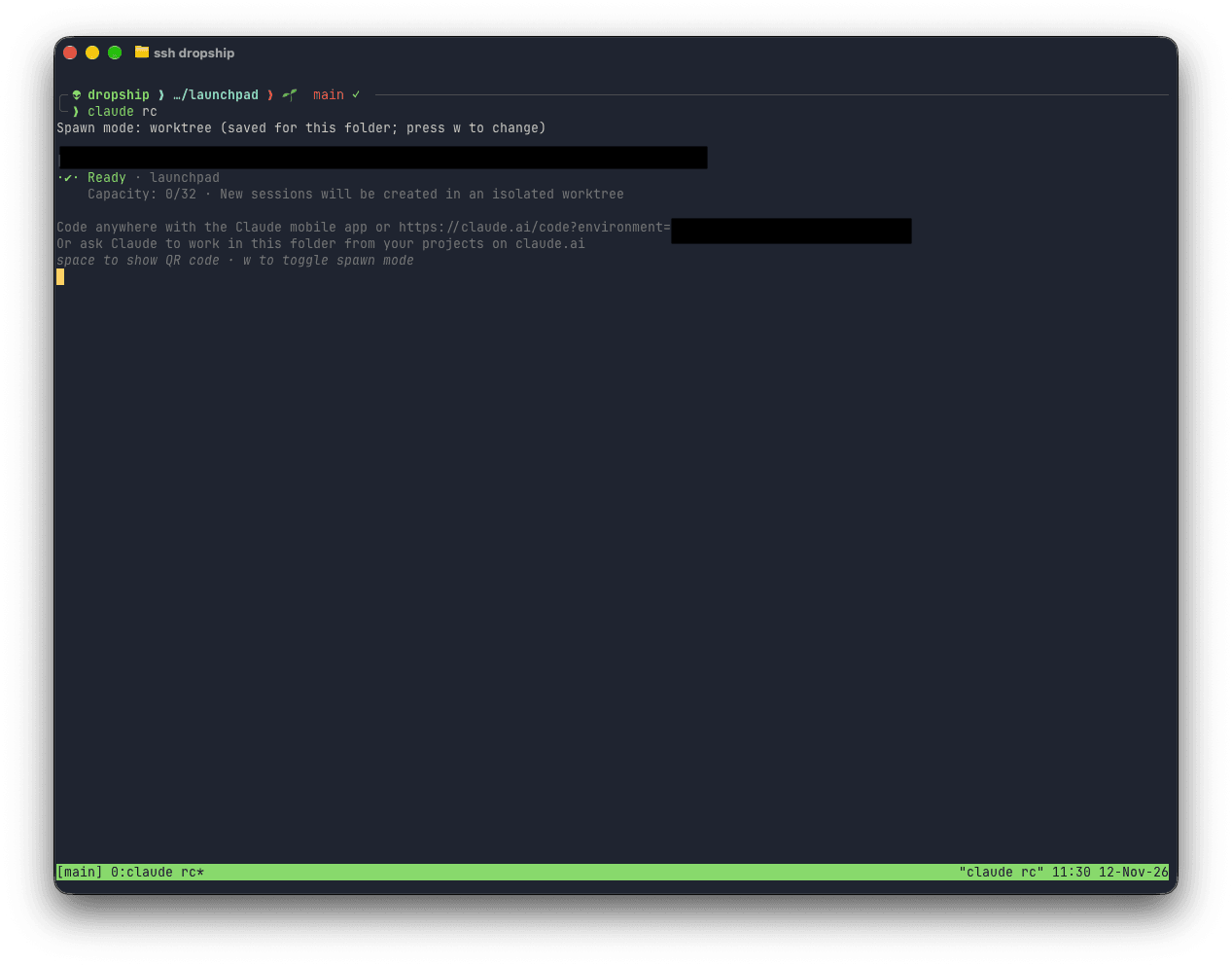
On the VPS, claude rc runs with its spawn mode set to worktree,
so each session I start from the Claude app gets its own isolated checkout, and parallel sessions can’t step on each other’s changes.
I still, though, review every piece of code Claude produces.
An Updated Workflow
The workflow itself changed in a few places, starting with how Claude picks up project context.
I replaced the .claude/rules/ folder with CLAUDE.md files placed in each relevant directory.
In April, the root CLAUDE.md pointed Claude at the right rule file for each project.
Now Claude Code loads a nested CLAUDE.md on its own, as soon as it works on a file in that directory:
.
├── CLAUDE.md
├── data
│   ├── CLAUDE.md
│   ├── ...
├── experimental
│   ├── ...
├── infrastructure
│   ├── CLAUDE.md
│   ├── docker
│   │   ├── cloudseclist
│   │   │   ├── CLAUDE.md
│   │   │   ├── ...
│   ├── ...
└── websites
    ├── CLAUDE.md
    ├── ...
As an example, this is the whole of websites/CLAUDE.md, which pulls in a shared frontend guide through an @ import:
# Websites

All websites use Docker Compose for local development:

- Start local dev with `lcli compose --account websites/[site] [cmd]`; no need to `cd` into the website directory.
- Verify changes visually with `agent-browser`:

@../.claude/shared/frontend-troubleshooting.md
Then, .claude/shared/workflow.md is still the focal point of every session, and it evolved quite a few times.
Compared to the April version, Claude now threat-models the design before I approve a plan, and hands the implementation to sub-agents:
## Development Workflow

1. Review the request and brainstorm
   - Use `/superpowers:brainstorming` for new features
   - Use `/superpowers:systematic-debugging` for bug fixes
2. Ask clarifying questions
3. Make a plan
   A. Draft the design.
   B. Dispatch the `threat-modeler` sub-agent with the draft design and the project root(s), never the conversation.
   C. Fold the result into the plan: paste the model and invariants tables as returned, apply its design changes to the design, and turn each test into a plan task for step 4 to carry into the to-do list. List promotions for Marco to accept or drop.
4. Only when we agree on a plan, create a detailed to-do list using the todo write function, with checkpoints for each phase
5. If writing code, add these review tasks at the end of the to-do list:
   A. Run the `code-simplifier` sub-agent first, alone: it edits the diff. Brief: the changed files and the verification command.
   B. Then, in parallel as sub-agents:
      I. `pattern-reviewer` (for projects with a `PATTERNS.md` file or `patterns` directory)
      II. `security-code-reviewer`. Brief: the changed files and the plan's invariants table, with the instruction "for each row, state held / broken / untested with file:line evidence, then do your full review".
      III. For frontend changes: `ui-design-reviewer` to verify visually, then, only if needed, `/impeccable critique` (UX and design quality) and `/impeccable audit` (accessibility, performance, anti-patterns)
6. Once we agree on the to-do list, start implementation. Pick the cheapest path that keeps context intact:
   A. Multi-file or multi-step work goes to the `implementer` sub-agent (runs on Opus) with a self-contained brief: the task, the files, exact values to use, interfaces decided in earlier tasks, the invariant tests this task owns, a file in the repo the result should resemble (an existing test, component, or fixture), and the verification command. The main session orchestrates and verifies.
   B. A few lines in files already in context: the main session edits directly.
   C. Implementers may run in parallel when their briefs name disjoint file sets. Each brief lists the files it may touch; a shared file (a registry in data/, a lockfile, generated code) goes to exactly one of them. Verification that touches shared infrastructure (lcli po test, a running stack) runs once from the main session after all have reported, not from each implementer. If the sets overlap or a task consumes another's output, run them in sequence. For fix rounds, resume the same agent with SendMessage so it keeps its context; dispatch fresh only when it has drifted.
   D. Never use `fork` for implementation: a fork always runs on the session model.
   E. Review findings (step 5) and verification failures go back through the path the change came from: a finding list to the implementer when it was delegated, direct edits otherwise.
7. During implementation (whichever path):
   A. Keep it simple and within the requested scope. Testing rules are in CLAUDE.md.
   B. For frontend changes:
      I. Propose to use `agent-browser` to verify visually. The app runs locally via `lcli` (URL in project README).
      II. Use impeccable skills when relevant:
         - `/impeccable polish` — final refinement pass before marking frontend work done
         - `/impeccable clarify` — improve user-facing copy, labels, error messages
         - `/impeccable layout` — fix layout, spacing, or visual hierarchy issues
         - `/impeccable adapt` — verify responsive behavior across screen sizes
8. Run the checks that cover the change and fix failures, at most 5 rounds before handing Marco the output. Where no local check exists or it cannot run, say so in the handoff.
9. Before the step-5 tasks run, whoever built the change interrogates the diff against the task, in this order:
   A. What rests on an assumption the task never stated? Challenge it; record the call under Decisions.
   B. What can be deleted entirely? Delete what was added beyond the ask and what the change left unused (Hard Rule 7).
   C. What gets simpler now that it is gone?
10. If the change adds, modifies, or removes a service, app, or piece of infrastructure, run the `/launchpad-service-sop` skill
11. Last, after every review-driven edit, use `/superpowers:verification-before-completion`
My sub-agents and skills also grew with it.
In addition to the agents from the previous post (pattern-reviewer, security-code-reviewer, security-researcher, ui-design-reviewer, marketing), I created three new ones:
code-simplifier, which simplifies the changed files without altering behaviour. It edits the diff, so it runs first and alone, before the read-only reviewers.implementer, which applies a self-contained brief (the task, the files, the exact values, and the verification command), and always runs onOpus.threat-modeler, which reads a draft design before I approve the plan, and returns the invariants the change must hold, with a test that proves each one.
As for custom skills, I now have over 20 of them, from writing styles to repo health checks.
Updated Settings
My .claude/settings.json stayed more or less the same, aside from a few small diffs.
For base models, I use Opus 5.5 as the default for the majority of sessions and for sub-agents, with Fable 5.2 as the advisor.
Claude consults the advisor before committing to an approach, and before calling a task done.
"env": {
  "CLAUDE_CODE_SUBAGENT_MODEL": "claude-opus-5-5"
},
"model": "claude-opus-5-5",
"advisorModel": "claude-fable-5-2",
The other change is that I enable Remote Control for every session, more on this later:
"remoteControlAtStartup": true,Remote Control
Finally, the way I start sessions changed.
In April I used Remote Control to kick off tasks from my phone.
Now, on the VPS, I run Claude in the background with claude rc, waiting for connections.
Note the spawn mode at the top: new sessions get their own worktree.
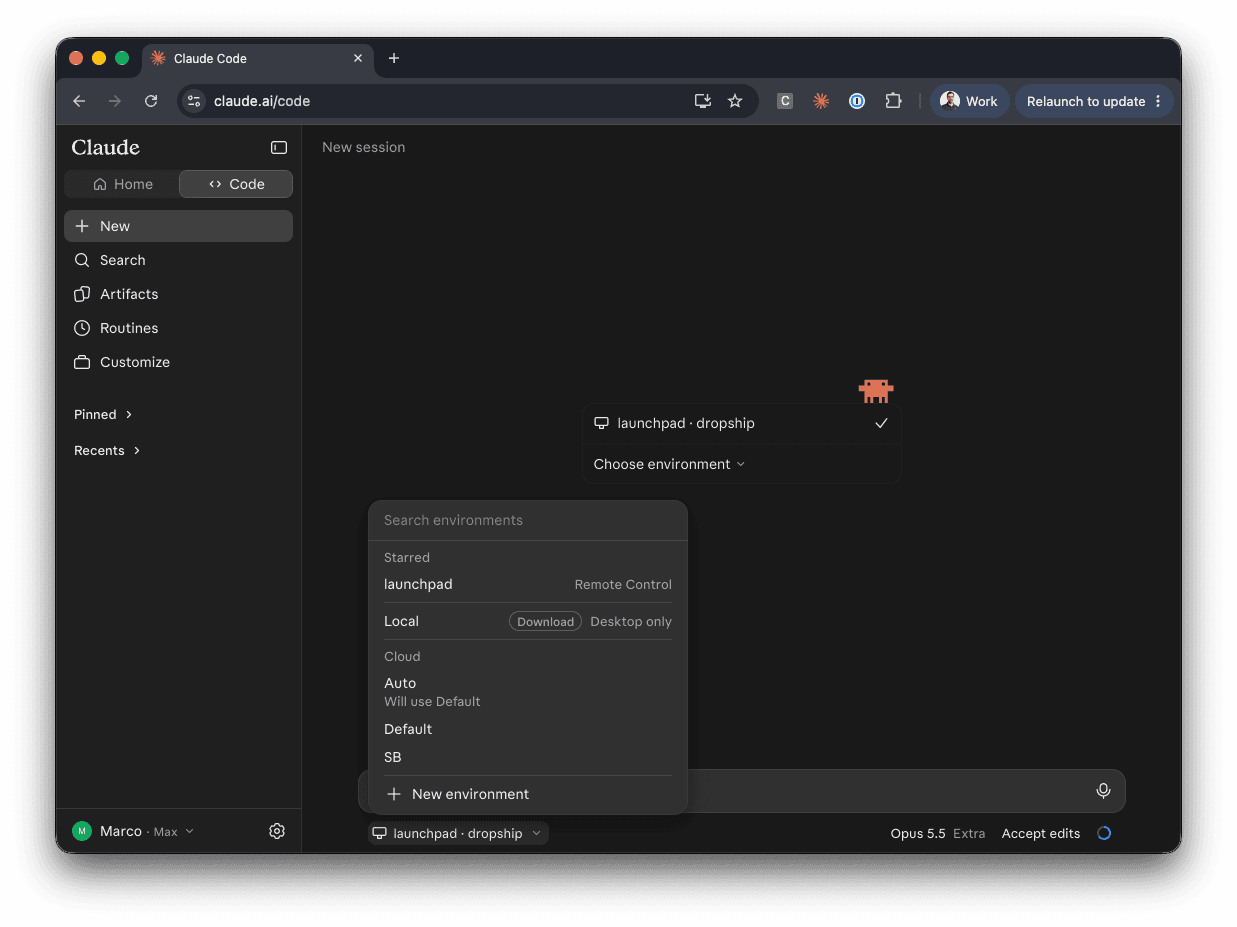
Then, from the Claude app (either web, desktop, or mobile), I can start a session directly on the VPS:
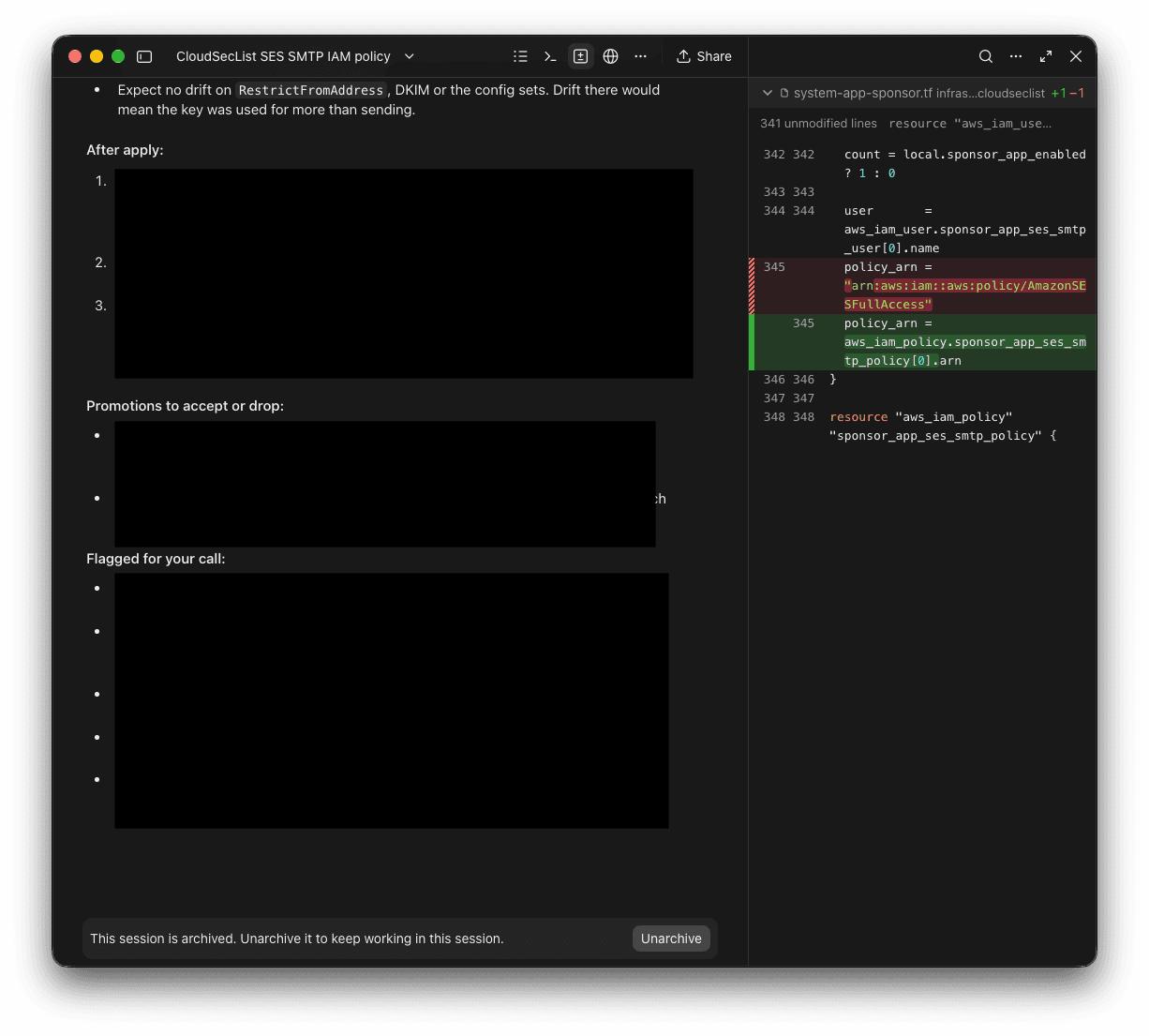
The additional perk is that the Claude app now has a built-in diff view, so I find myself relying on code-server (running on the VPS) less and less. Each session’s diff sits next to the conversation that produced it, and I can review the change without leaving the chat.
Conclusions
In April I wrote that what’s here today would look different in six months. Seven months later, Claude runs on a VPS with no inbound access, and I start and review sessions from the Claude app.
As before, none of this is a recipe. It’s how I’m using Claude Code today.
I hope you found this post valuable and interesting, and I’m keen to get feedback on it! If you find the information shared helpful, if something is missing, or if you have ideas on improving it, please let me know on 🐣 Twitter or at 📢 feedback.marcolancini.it.
Thank you! 🙇♂️