Reading time ~12 minutes
My Claude Code Setup (2026 Edition)
Claude Code ships with a capable baseline. After months of daily use across a multi-project monorepo, my default install has grown into something that looks less and less like the box it came in.
Rather than dump a big settings.json and hope it’s useful, I want to walk through my own setup.
Starting Points
A couple of things frame everything else.
First, since Opus 4.6 I’ve been on the Max plan (£90/month). The previous tier burned through credits every other hour, which wasn’t sustainable.
Second, you might remember from previous posts (like
My Blogging Stack
and
Building a Serverless Mailing List in AWS )
that all my projects live in the same monorepo.
That shape matters here, because the .claude/ config lives alongside the code it applies to.
At the root, a primary CLAUDE.md provides context around:
- Repo overview (key concepts, directory structure, key technologies)
- Philosophy (mostly inspired by the Trail of Bits Claude Code Config)
- Development (how to use my custom CLI for both web and infra work)
- Important patterns
- Preferred communication style
The side effect of that shape is that I don’t use worktrees. I’m aware I could spawn multiple sessions in parallel, but as the only user of this monorepo I prefer to keep one active session at a time. I review every piece of code Claude produces, and the context-switching cost of juggling multiple conversations in parallel doesn’t offset the notional speedup.
Global Settings
Everything lives in my monorepo’s .claude/ directory. It’s version-controlled, reviewed like any other change, and evolves with the work.
The top of .claude/settings.json sets the defaults for Claude Code itself:
"autoMemoryEnabled": true,
"alwaysThinkingEnabled": true,
"effortLevel": "xhigh",
"showThinkingSummaries": true,
"env": {
  "CLAUDE_CODE_DISABLE_ADAPTIVE_THINKING": 1,
  "CLAUDE_CODE_AUTO_COMPACT_WINDOW": "400000",
  "CLAUDE_CODE_EXPERIMENTAL_AGENT_TEAMS": "1",
  "CLAUDE_CODE_AUTO_CONNECT_IDE": "true",
  "DISABLE_ERROR_REPORTING": "1",
  "CLAUDE_CODE_DISABLE_FEEDBACK_SURVEY": "1"
}- Thinking is always on, set at
xhigheffort, with adaptive downshifting locked off so Claude doesn’t skimp on a hard problem (a regression several people have flagged with Opus 4.6+). - Memory is always on too.
- Thinking summaries surface in the terminal so I can follow the reasoning without digging.
- The auto-compact window is capped at
400ktokens. Running sessions on the full1Mcontext of Opus showed significant degradation, so I cap it earlier to keep responses coherent. - Agent teams is still experimental, but it pays off for parallel exploration when I dispatch two or three subagents at once.
- VS Code auto-connects so I don’t have to wire the IDE integration manually.
- Error reporting and the feedback survey are off: fewer popups, less telemetry.
Guardrails
The most opinionated part of my setup is what it refuses to do.
Starting with the sandbox. The whole thing runs inside one:
"sandbox": {
  "enabled": true,
  "autoAllowBashIfSandboxed": false,
  "network": {
    "allowUnixSockets": [
      "~/.agent-browser/default.sock"
    ]
  }
}
Network access is blocked by default, filesystem writes are restricted to the project directory, and I explicitly allow the agent-browser Unix socket as the one carve-out.
Even a compromised skill or a hallucinated command has a narrow blast radius.
On top of the sandbox, hooks carry most of the day-to-day enforcement:
"hooks": {
  "PreToolUse": [
    {
      "matcher": "Bash",
      "hooks": [
        {
          "type": "command",
          "command": "CMD=$(jq -r '.tool_input.command'); if echo \"$CMD\" | grep -qE 'rm[[:space:]]+-[^[:space:]]*r[^[:space:]]*f'; then echo 'BLOCKED: Use trash instead of rm -rf' >&2; exit 2; fi"
        },
        {
          "type": "command",
          "command": "CMD=$(jq -r '.tool_input.command'); if echo \"$CMD\" | grep -qE 'git[[:space:]]+push.*(main|master)'; then echo 'BLOCKED: Use feature branches, not direct push to main' >&2; exit 2; fi"
        },
        {
          "type": "command",
          "command": "CMD=$(jq -r '.tool_input.command'); if echo \"$CMD\" | grep -qE '^[[:space:]]*(docker|docker-compose|terraform|npm|yarn|pnpm|python|pip|poetry|bundle|gem)[[:space:]]'; then echo 'BLOCKED: Use lcli instead of running direct commands. See CLAUDE.md.' >&2; exit 2; fi"
        },
        {
          "type": "command",
          "command": "CMD=$(jq -r '.tool_input.command'); if echo \"$CMD\" | grep -qE 'lcli[[:space:]]+infra[[:space:]]+tf.*--action[[:space:]]+(destroy|apply)'; then echo 'BLOCKED: Terraform destroy/apply must be run by the user directly. Suggest the command instead.' >&2; exit 2; fi"
        }
      ]
    },
    {
      "matcher": "Edit|Write",
      "hooks": [
        {
          "type": "command",
          "command": "bash $CLAUDE_PROJECT_DIR/.claude/hooks/warn-shared-modules.sh"
        }
      ]
    }
  ]
}
A PreToolUse hook sits in front of every Bash call and blocks a handful of patterns I never want to execute by accident:
rm -rfis replaced by atrashcall.- Pushing to
mainnever happens; the agent always works in feature branches. - The agent never runs raw commands (
docker,npm,terraform,python, and the rest). The only thing it’s allowed to run is my custom CLI,lcli, which handles cross-project coordination, environment setup, and validation. - The agent never runs
terraform applyorterraform destroy. Those are mine (or CI’s) to execute. Claude suggests the command, I run it. That’s the only pattern I trust for work that changes cloud state.
If Claude tries one of those, the hook exits with code 2, prints a message, and the command never runs.
There’s one non-blocking guardrail worth mentioning.
A separate PreToolUse hook matches Edit|Write and calls warn-shared-modules.sh.
It doesn’t block anything.
It just prints a reminder when I’m about to touch common/modules/ or data/services.yaml, files that ripple across the monorepo.
Finally, permissions set the explicit allow/deny floor:
"permissions": {
  "allow": [
    "Bash(agent-browser:*)",
    "Bash(cat:*)",
    "Bash(cd:*)",
    "Bash(cmux browser:*)",
    "Bash(command docker logs:*)",
    "Bash(command -v cmux)",
    "Bash(echo:*)",
    "Bash(find:*)",
    "Bash(gh auth status:*)",
    "Bash(gh pr create:*)",
    "Bash(gh pr list:*)",
    "Bash(gh pr view:*)",
    "Bash(git diff:*)",
    "Bash(git log:*)",
    "Bash(grep:*)",
    "Bash(ls:*)",
    "Bash(test:*)",
    "Bash(wc:*)",
    "Edit(~/.claude/plans/**)",
    "mcp__context7__query-docs",
    "mcp__ide__getDiagnostics",
    "mcp__plugin_context7_context7__query-docs",
    "mcp__plugin_context7_context7__resolve-library-id",
    "mcp__plugin_episodic-memory_episodic-memory__read",
    "mcp__plugin_episodic-memory_episodic-memory__search",
    "mcp__plugin_linear_linear__get_issue",
    "mcp__plugin_linear_linear__get_team",
    "mcp__plugin_linear_linear__list_issue_labels",
    "mcp__plugin_linear_linear__list_issues",
    "mcp__plugin_linear_linear__list_projects",
    "mcp__plugin_linear_linear__list_teams",
    "mcp__plugin_Notion_notion__notion-fetch",
    "Skill(agent-browser:agent-browser)",
    "Skill(agent-browser)",
    "Skill(episodic-memory:search-conversations)",
    "Skill(superpowers:brainstorming)",
    "Skill(superpowers:executing-plans)",
    "Skill(superpowers:systematic-debugging)",
    "WebFetch(domain:code.claude.com)",
    "WebFetch(domain:code.visualstudio.com)",
    "WebFetch(domain:community.cloudflare.com)",
    "WebFetch(domain:developers.cloudflare.com)",
    "WebFetch(domain:docs.aws.amazon.com)",
    "WebFetch(domain:docs.claude.com)",
    "WebFetch(domain:docs.github.com)",
    "WebFetch(domain:docs.renovatebot.com)",
    "WebFetch(domain:docs.virustotal.com)",
    "WebFetch(domain:github.com)",
    "WebFetch(domain:nextjs.org)",
    "WebFetch(domain:raw.githubusercontent.com)",
    "WebFetch(domain:registry.terraform.io)",
    "WebFetch(domain:stackoverflow.com)",
    "WebFetch(domain:supabase.com)",
    "WebFetch(domain:tailadmin.com)",
    "WebFetch(domain:www.claude.com)",
    "WebFetch(domain:www.npmjs.com)",
    "WebSearch"
  ],
  "deny": [
    "Bash(rm -rf *)",
    "Bash(rm -fr *)",
    "Bash(sudo *)",
    "Bash(mkfs *)",
    "Bash(dd *)",
    "Bash(git push --force*)",
    "Bash(git push *--force*)",
    "Bash(git reset --hard*)",
    "Edit(~/.bashrc)",
    "Edit(~/.zshrc)",
    "Edit(~/.ssh/**)",
    "Read(~/.ssh/**)",
    "Read(~/.aws/**)",
    "Read(~/.config/gh/**)",
    "Read(~/.git-credentials)",
    "Read(~/.docker/config.json)",
    "Read(~/Library/Keychains/**)"
  ],
  "additionalDirectories": [
    "~/.agent-browser"
  ]
}
Destructive commands, credential reads, and shell-config edits are denied outright, regardless of any hook logic.
The permissions.allow list is the complement: it pre-approves ~45 common commands and MCP calls (Bash(git diff:*), Bash(gh pr view:*), Bash(find:*), Bash(wc:*), specific MCP tools, specific skills, a curated WebFetch domain list).
It grows iteratively: every time Claude asks for a permission I deem safe, I add it so it never has to ask again.
My Workflow
For anything other than a trivial change, I’m a huge fan of the context/plan/code approach.
My interaction style is iterative and feedback-driven rather than spec-heavy upfront. I spend time providing up-front context and iterating on a plan, then delegate the actual implementation aggressively to multiple sub-agents.
The challenge with a monorepo that houses independent projects is that each one can have genuinely different conventions.
That’s why, instead of one bloated CLAUDE.md, the root file references per-project context conditionally:
.claude/
├── rules/
│   ├── primeoutpost.md
│   ├── ...
│   ├── ...
│   ├── ...
│   └── cloudseclist.md
└── shared/
    ├── workflow.md
    └── frontend-troubleshooting.md
Claude reads the relevant rule file only when working in that project.
The root CLAUDE.md stays short, and each project gets the depth of context it needs without drowning the others.
Beyond the per-project context in rules/, the piece that made this approach click is shared/workflow.md:
## Development Workflow

1. Review the request, think about it, and brainstorm
   - Use /superpowers:brainstorm for new features
   - Use /superpowers:systematic-debugging for bug fixes
2. Ask clarifying questions
3. Think hard and make a plan
4. Only when we agree on a plan, create a detailed to-do list using the todo write function, with checkpoints for each phase
5. If writing code, add these review tasks at the end of the to-do list:
   A. Run the `pattern-reviewer` sub-agent
   B. Run the `code-simplifier:code-simplifier` plugin
   C. Run the `security-code-reviewer` sub-agent
   D. For frontend changes:
      I. Run the `ui-design-reviewer` sub-agent to verify visually
      II. Run these impeccable reviews:
      - `/impeccable:critique` — UX and design quality review
      - `/impeccable:audit` — technical quality (accessibility, performance, anti-patterns)
6. Once we agree on the to-do list, start implementation
7. During implementation:
   A. Keep things simple and stick to the requested scope
   B. Do NOT over-complicate things
   C. Do NOT add unnecessary complexity
   D. For frontend changes:
      I. Use `agent-browser` to verify visually. The app runs locally via `lcli` (URL in project README).
      II. Use impeccable skills when relevant:
         - `/impeccable:polish` — final refinement pass before marking frontend work done
         - `/impeccable:clarify` — improve user-facing copy, labels, error messages
         - `/impeccable:arrange` — fix layout, spacing, or visual hierarchy issues
         - `/impeccable:adapt` — verify responsive behavior across screen sizes
8. At the end of implementation, use /superpowers:verification-before-completion
Subagents, skills, and plugins extend this workflow. More on each below.
Extensions
Three kinds of compound tools do most of the work: subagents, skills, and plugins.
Agents
Subagents are narrowly-scoped roles in .claude/agents/:
pattern-reviewer, which enforces project code patterns.security-code-reviewer, which reviews diffs for vulnerabilities.security-researcher, which analyzes threats and reads advisories.ui-design-reviewer, which catches design inconsistencies before I push.marketing, which drafts LinkedIn and Twitter posts from repo content.
Each has its own tool allowlist and system prompt.
The main conversation invokes them via the review steps in workflow.md whenever a task matches their scope.
Skills
Skills live in .claude/skills/ and automate work I repeat often.
I’ll skip the individual details here since they’re tightly coupled to my specific projects, so they wouldn’t transfer.
The pattern is what matters: if you find yourself writing the same preamble more than twice, that’s a skill.
Plugins
Plugins add seventeen more capabilities on top of the custom skills:
"enabledPlugins": {
  "agent-browser@agent-browser": true,
  "claude-md-management@claude-plugins-official": true,
  "code-simplifier@claude-plugins-official": true,
  "commit-commands@claude-plugins-official ": true,
  "context7@claude-plugins-official": true,
  "episodic-memory@superpowers-marketplace": true,
  "feature-dev@claude-plugins-official": true,
  "frontend-design@claude-plugins-official": true,
  "impeccable@impeccable": true,
  "linear@claude-plugins-official": true,
  "marketing-skills@marketingskills": true,
  "notion@claude-plugins-official": true,
  "playwright@claude-plugins-official": true,
  "pyright-lsp@claude-plugins-official": true,
  "security-guidance@claude-plugins-official": true,
  "superpowers@claude-plugins-official": true,
  "superpowers@superpowers-marketplace": true,
  "typescript-lsp@claude-plugins-official": true
},
"enabledMcpjsonServers": [
  "cloudseclist-sponsor"
],
The daily drivers:
superpowers, which provides amazing workflow skills (brainstorming, writing-plans, systematic-debugging) that structure long tasks into reviewable phases.impeccable, for design and UX review on frontend work.episodic-memory, so past conversations resurface when relevant.agent-browser, which drives a real browser from the shell (I use this instead of Playwright MCP for visual verification).context7, which fetches up-to-date library documentation mid-task.linearandnotion, for working against my planning tools without tab-switching.
The rest are situational: pyright-lsp and typescript-lsp for language servers, feature-dev for larger feature work, claude-md-management for CLAUDE.md audits, code-simplifier for refactoring passes, security-guidance for hardening reviews, commit-commands for repeatable git flows, frontend-design and marketing-skills for content work, playwright for browser automation as a fallback.
Having them all installed means the surface is there when I need it, without me having to remember to enable anything.
I also run one custom MCP server.
The cloudseclist-sponsor entry in enabledMcpjsonServers exposes my CloudSecList sponsorship and financial data as MCP tools, so Claude can answer “which sponsors are renewing next month?” directly instead of me scraping the database.
Remote Control
The last piece is the Remote Control feature.
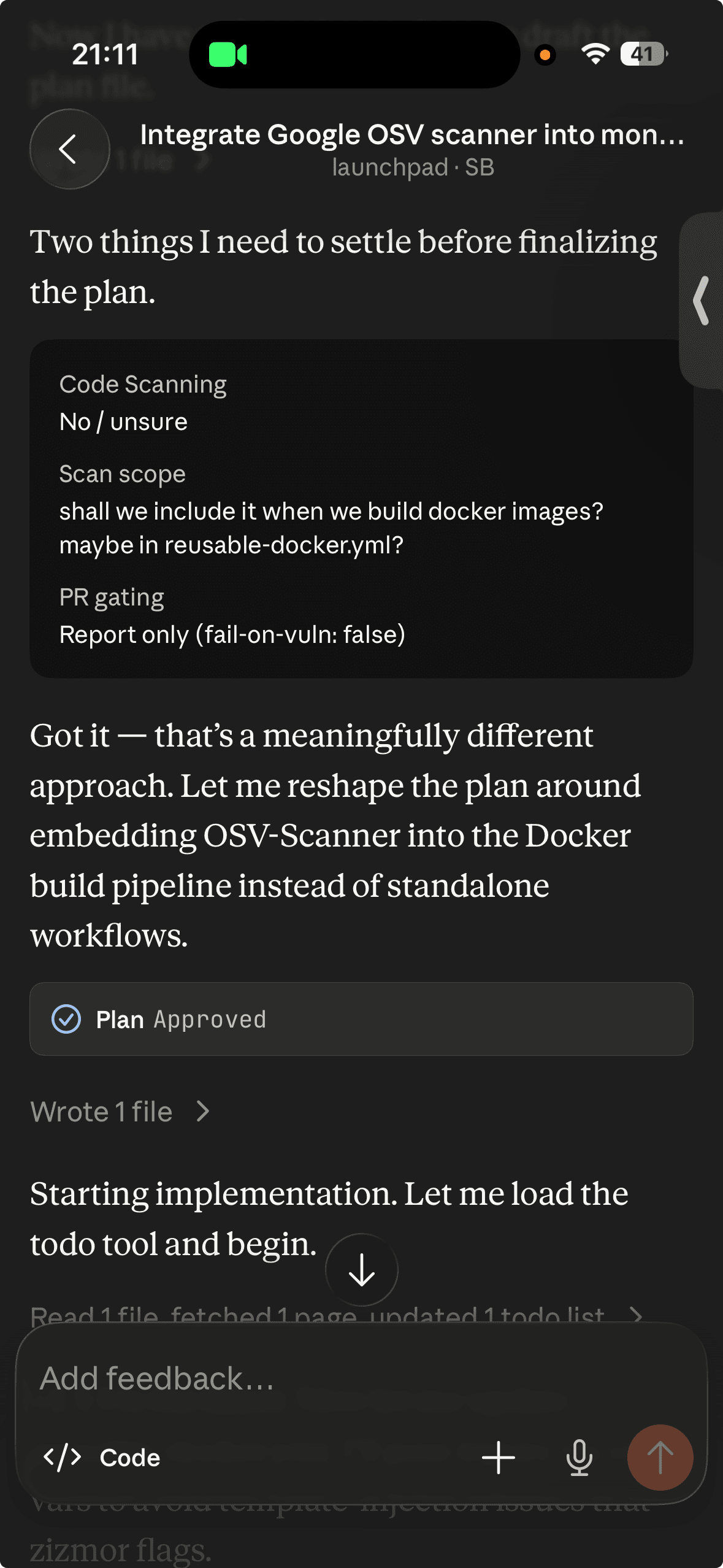
The Claude Code mobile app lets me kick off a review or a triage task while away from the desk and continue it on the laptop when I’m back. The setup travels because everything I’ve described lives in the repo. There’s no workstation-local state to sync.
Customisation
As with any tool, I genuinely believe you should spend time customising it to make it helpful to you.
Here’s how I did it.
Statusline
A custom statusline is the part I’d argue is the most practically useful. It shows a token budget, progress against context compaction, and project metadata at the bottom of the terminal.
Without it, I used to get surprised by compaction events mid-task. With it, I can pace my sessions.

Spinner verbs
Spinner verbs are the smallest move of the lot, but the one I notice most.
Claude’s default “Thinking…“ is replaced with 32 StarCraft-themed alternatives ("Constructing additional pylons", "Yamato charging", "Nuking from orbit").
Purely cosmetic. But I smile every time “Nuking from orbit…” fires on a session.
"spinnerVerbs": {
  "mode": "replace",
  "verbs": [
    "Activating solar core",
    "APM increasing",
    "Auto-turret deploying",
    "Blinking forward",
    "Building bunkers",
    "Chronoboosting",
    "Constructing additional pylons",
    "Disruptor charging",
    "Dropping supply depots",
    "Forging upgrades",
    "Landing sequence",
    "Lifting off",
    "Locking down",
    "Medivac boosting",
    "Mothership cloaking",
    "Nexus charging",
    "Nuking from orbit",
    "Orbital commanding",
    "Phasing in",
    "Pylon overcharging",
    "Pylon powering",
    "Reactor swapping",
    "Recalling units",
    "Repairing mech",
    "Salvaging bunkers",
    "Scouting the map",
    "Sentry patrolling",
    "Spawning more overlords",
    "Stimpacking",
    "Training SCVs",
    "Warping in",
    "Yamato charging"
  ]
}
Sounds
Finally, the one I enjoy the most.
If you haven’t picked up the theme from the section above, I’m a StarCraft fan. I wire hooks to Claude’s lifecycle events to play sounds at the right moments.
"hooks": {
  "SessionStart": [
    {
      "hooks": [
        {
          "type": "command",
          "command": "afplay $CLAUDE_PROJECT_DIR/.claude/hooks/starcraft-locked-in.mp3"
        }
      ]
    }
  ],
  "UserPromptSubmit": [
    {
      "hooks": [
        {
          "type": "command",
          "command": "afplay $CLAUDE_PROJECT_DIR/.claude/hooks/starcraft-marine-good-to-go.mp3"
        }
      ]
    }
  ],
  "PermissionRequest": [
    {
      "hooks": [
        {
          "type": "command",
          "command": "afplay $CLAUDE_PROJECT_DIR/.claude/hooks/starcraft-orders-captain-scv.mp3"
        }
      ]
    }
  ],
  "Stop": [
    {
      "hooks": [
        {
          "type": "command",
          "command": "afplay $CLAUDE_PROJECT_DIR/.claude/hooks/starcraft-protoss-upgrade.mp3"
        }
      ]
    }
  ],
  "SessionEnd": [
    {
      "hooks": [
        {
          "type": "command",
          "command": "afplay $CLAUDE_PROJECT_DIR/.claude/hooks/starcraft-confirm.mp3"
        }
      ]
    }
  ],
  "Notification": [
    {
      "matcher": "",
      "hooks": [
        {
          "type": "command",
          "command": "osascript -e \"display notification \\\"Awaiting your input\\\" with title \\\"Claude Code\\\"\" sound name \"Ping\""
        },
        {
          "type": "command",
          "command": "afplay $CLAUDE_PROJECT_DIR/.claude/hooks/starcraft-scv-reporting-for-duty.mp3"
        }
      ]
    }
  ]
}
A session start plays “Locked in.” A new prompt plays “Good to go, sir.” A permission request asks “Your orders, Captain?” The Stop hook closes with the Protoss upgrade sting.
It sounds silly written down. In practice, I can tell, without looking at the terminal, whether Claude is done, waiting on me, or still running.
The Notification hook does double duty.
It plays an audio cue and fires a macOS osascript popup titled “Claude Code” with “Awaiting your input.”
That last part is what makes “leave the terminal and come back” actually work: I can be reading a PR in another window and still get notified when Claude needs me.
Conclusions
None of this is a recipe. It’s my personal point of view on how I’m using Claude Code today.
The configuration is version-controlled, reviewed like any other code, and evolves with the work. What’s here today will look different in six months, and that’s the point: the tool gets more opinionated as I learn where I keep making the same mistake, or where I keep repeating the same manual step.
I hope you found this post valuable and interesting, and I’m keen to get feedback on it! If you find the information shared helpful, if something is missing, or if you have ideas on improving it, please let me know on 🐣 Twitter or at 📢 feedback.marcolancini.it.
Thank you! 🙇♂️